
How To Drop a Class
To drop classes, please follow these steps:
- Go to my.okstate.edu Student Portal
- Log In with your O-KEY Username (or okstate.edu email address) and Password
- Click on the Self Service Icon on the HOME Tab.
- Click on the STUDENT tab
- Click the Registration link
- Click Register for Classes
- Select the Term and click the Submit button
- Use the dropdown Action list to select Drop/Delete
If you drop within the no refund, automatic W grade period, select Drop with Automatic W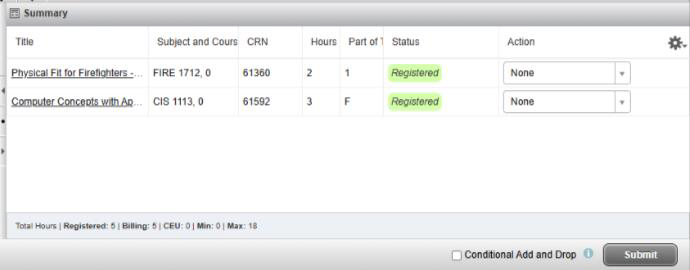
- Click the Submit button in the lower right corner to save your changes
Dropping a Class with a Registration Hold
The student system empowers students to handle their own registration via Self-Service throughout the semester (within applicable add/drop deadlines), including when the university is closed. Students with registration holds, however, may not be allowed to make these changes online. Students with holds who need to drop a class during the can follow the instructions below:
- Download and complete a Drop/Add Form.
- Submit the completed request to drop form to the Office of the Registrar via email (okc.registrar@okstate.edu) from your OKSTATE email address, or fax it to 405-945-3277 no later than the published drop deadline for the class.
- The Registrar’s Office will process completed drop cards which have been received via email or fax by the published deadline.
Complete Withdrawal
Before considering a withdrawal from OSU-OKC, students should first consult their academic advisor. Students must complete the Withdrawal Form, which is initiated by the student within applicable deadlines. Withdrawals will be processed as of the date submitted by the student and according to the drop and refund deadlines for each registered class. Please visit the Academic Calendar for applicable drop, withdrawal and refund deadlines.