Class Schedules
The online Class Schedule helps you search the semester schedule of classes by term. Used the Advanced Search link to search by instructional method (online, traditional classroom or hybrid), general education attribute, instructor, class days or times, and more.
Student Course Enrollment Questions?
Call: (405) 945-8678
Email:okc.advisement@okstate.edu
Faculty/Department Class Schedule Questions?
Call: (405) 945-3291
Email:okc.schedule@okstate.edu
How to Search for Classes
Browse Classes allows multiple ways to search for class sections offered in each semester. After selecting a term, you can enter your search criteria in the fields provided or click the Advanced Search link.
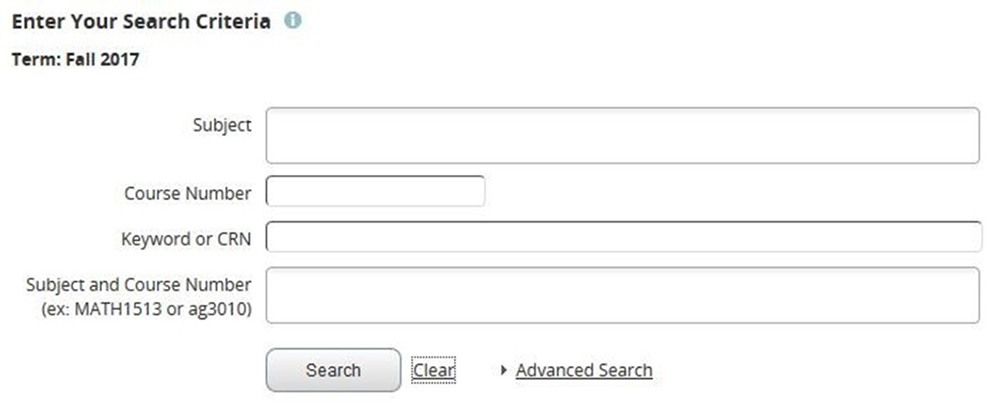
Here are some tips for entering search criteria in Browse Classes:
- Entering a subject is NOT required.
- To see the available list of values for a search criterion, click in that field and the options will display below. Click on one or more options to include them in your search criteria. To narrow down the values that display, start typing the description, then select the desired option from the smaller list that appears. (Note that adding multiple options in a single search criterion will connect those options with an “or” when applying your search criteria.)
- The % wildcard character can be used in the Course Number and Title fields.
- To return open sections only, use the Advanced Search and click the Open Sections Only box (at the very bottom). Note that full/closed sections with waitlists will display in the results.
- Click the Clear link at the bottom to clear out all previous search criteria and start fresh with a new search.
Your search results will display in a list format like the image below:
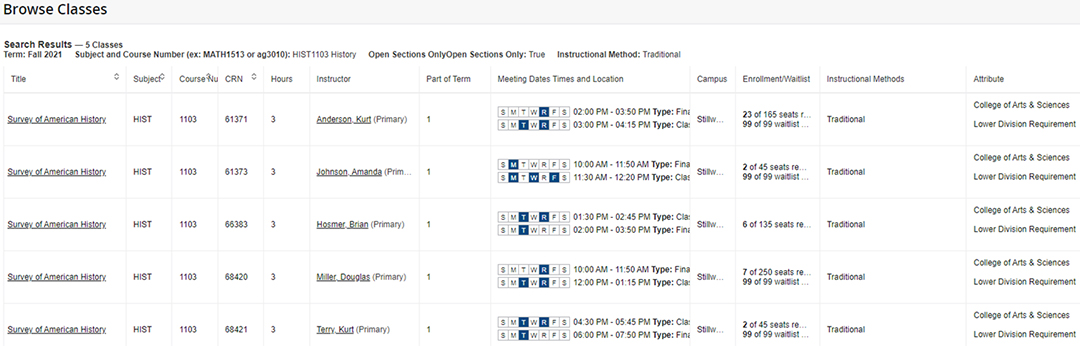
If you hover over something that isn’t fully displayed, a pop-up box will appear that shows all the details.
View Class Details
How to view class details
Click on a class title or CRN from anywhere in Self-Service to access full class details, including the instructional method, catalog course description, textbook information, enforced prerequisites, other registration restrictions, drop/add and refund deadlines, class meeting days/times and location, special class fees, and more. The orange arrows in the images below provide examples of where you can click on a class title from Self-Service to access the class details.

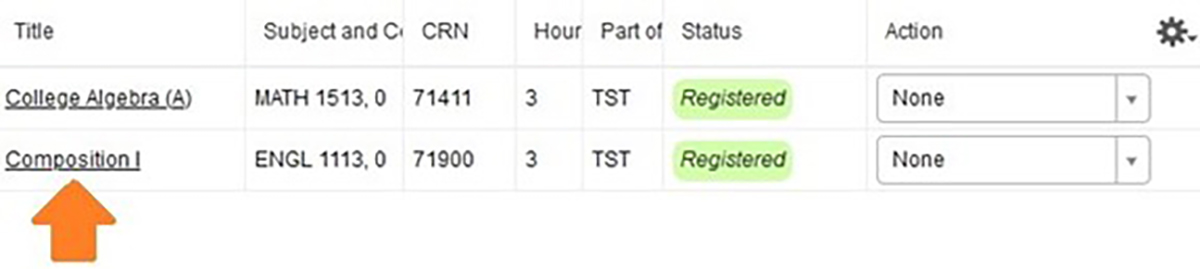

After you click on a class title or CRN, the class details box will appear as shown below.

Instructional Method
The instructional method, or modality, of the course (e.g. traditional face-to-face, online, hybrid) is listed in class schedule views and on the class details home tab. The example shown below reflects a hybrid course, which means that it includes a blend of traditional face-to-face and online instruction. Details of blended/hybrid delivery can be obtained from the instructor on a course-by-course basis, typically from the Canvas course site.

Class meeting days/times and location
Click on the “Instructor/Meeting Times” tab to view the class meeting days/times and locations. The instructor for each class meeting will also display here. Note that “R” stands for Thursday in the days of the week pillbox.

For classes with more than one meeting, click on the small arrow to the left of “Instructor” to expand additional meeting details.
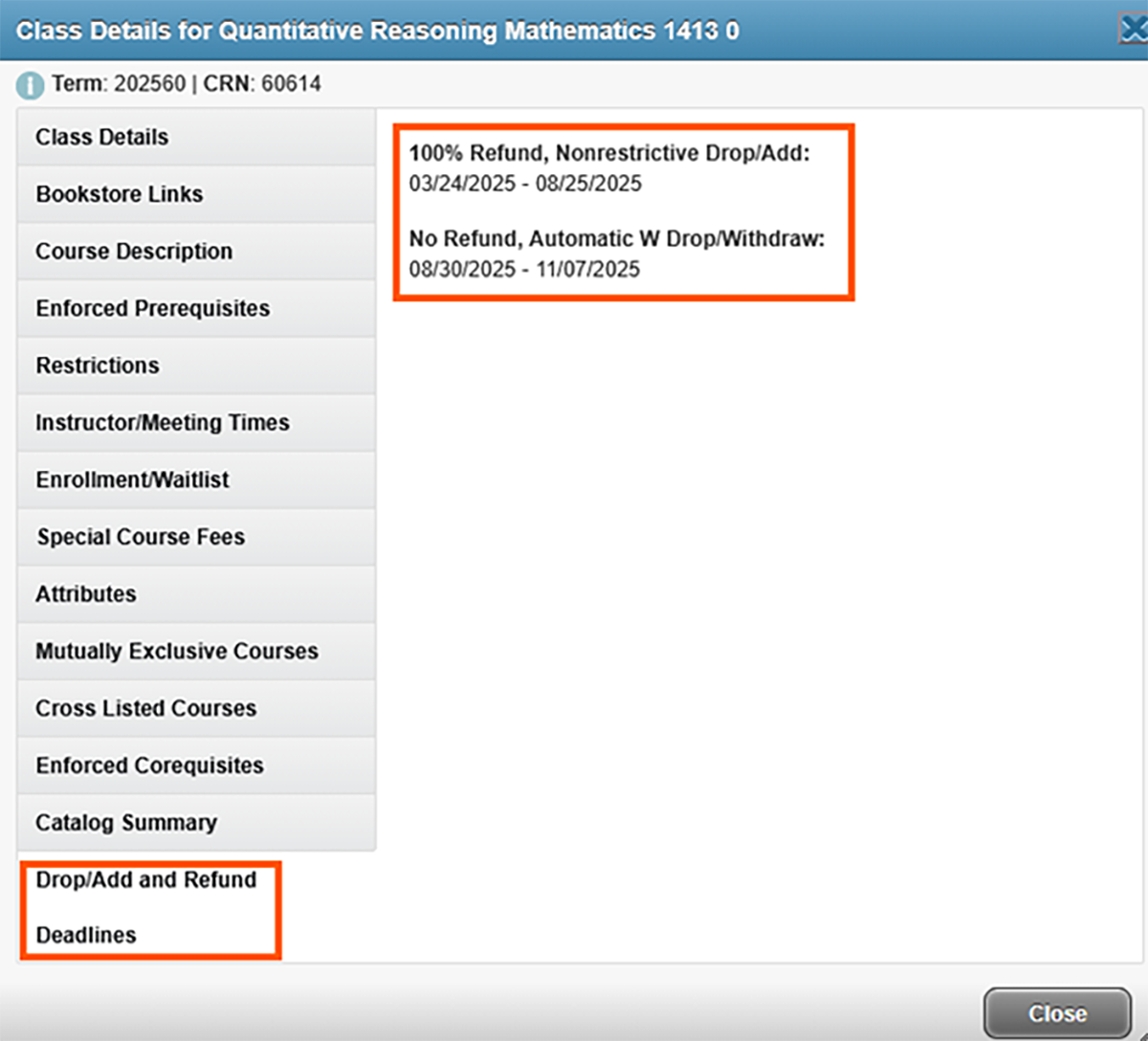
Drop/add and refund deadlines
Click on the “Drop/Add and Refund Deadlines” tab to view the 100% Refund, Nonrestrictive Drop/Add and Automatic W Drop/Withdrawal (No Refund) deadlines for the course.