
Testing and Assessment Center
The OSU-OKC Testing Center's hours are Mon-Thu, 8am-6pm; Fri 9am-5pm
Phone: 405-945-8648 Email: okc.testing@okstate.edu
All testing stops at 10 minutes before closing.
OKC Professor Exam Submission Process
The Testing Center is here to assist you with
- Make up exams – students who missed an exam on the day the exam was given
- Students with technology issues
- Accommodations that cannot be met in the classroom or in the online format.
Process:
Once you have decided to allow students to test in the testing center
1. Submit an exam submission for approval
- Submit all submissions by 2:00 pm 1 business day BEFORE the student needs to test.
- The approval process takes 1 business day or 24 hours.
- Students are not able, nor are we able to register students for their appointment until this approval process is over.
- If for some reason you need your submission approve outside of this window, contact the testing center
2. Once the Submission is approved, tell the student to make an appointment
- You will see your exam is approved in your dashboard – (This is 1 business day or 24 hours after the exam submission is submitted)
- Tell students to schedule their appointments through: https://www3.registerblast.com/osuokc/Exam/List
- If they have issues,
- Check your submission and make sure you have spelled their name correctly
- (First Last) first letter of the first and last name capitalized. No added spaces, etc. It has to be exactly like you typed it in. Many students will accidentally add an extra space and the end of their name(s)
- Have them close their browser and reopen it and try again.
- Have them contact the Testing Center
- Check your submission and make sure you have spelled their name correctly
To Submit an Exam Submission:
Log into www.registerblast.com/osuokc/professor/login
Need an account?
- If you get a message that says your email is not in Register Blast, you will need to create an account at www.registerblast.com/osuokc/professor/enroll .
- Please, give the Testing Center 24 hours to approve your account.
- If you need the approval sooner than 24 hours, please contact us okc.testing@okstate.edu or call us at 405.945.8648
Your Professor Portal:
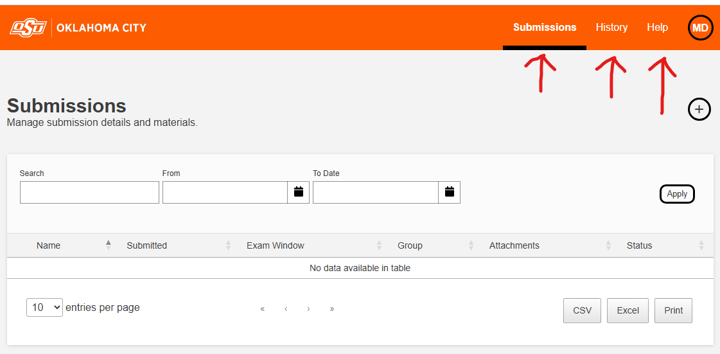
Your dashboard has 3 pages
- Submission – This opens by default and holds all of your open submissions
- History – This shows you your students who have made appointments and their testing status
- Help – This holds helpful information from Register Blast on the basics of how to use your portal.
All Exam Submission must have :
Each exam requires an exam submission/instructions to be submitted with
- The instructions for the exam
- Time limit for the exam.
- Any necessary documents
- The names of the students that can take the exam
All students on the Exam Submission must test under the same instructions
- If you have a student that has one thing different, they will have to be on their own exam submission
- If you have multiple students in the same class with the same accommodations and instructions, they can go on one submission
- Multiple classes can be on one submission, or you can separate by classes, if the instructions are the same for all the students listed on the submission.
If you only have 1-3 students on your exam submission, please list their last name in parenthesis after the exam title. For example: MATH 1234, Algebra, Exam 1 (Brown, Smith)
If you have similar exams, you can use the CLONE feature. Be sure to
- Remove the “Clone of” from the exam title
- Update the fields that need updating
- Have the correct students on your exam submissions.
- If a submission is already approved, do NOT remove students from the submission. Contact the testing center to remove students.
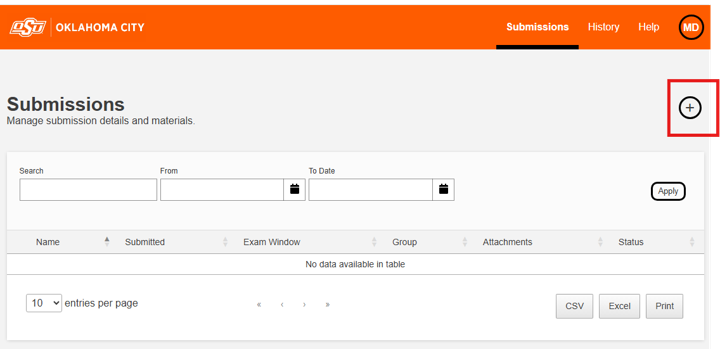
Start an Exam Submission
- Click the
- Fill in the form
- If you hover over the ? and a description of what is needed in the field will show
Helpful Information:
- Course, Course Name, Exam Name
- For example: “MATH 1234, College Algebra, Exam 1” or “EMSP 1234, EMT Fund, Exam 3”
- Exam groups are
- Paper or Online – Select how the student will take the exam in the testing center.
- Tell your students their test is either on online or on paper, so they can find their exam when registering
- Paper or Online – Select how the student will take the exam in the testing center.
- Exam Dates:
- Exam dates in Canvas must match the exam dates listed on the exam submission and the exam must be open.
- Allotted Minutes:
- Time limit for the exam.
- Put in the actual minutes you are allowing for the exam, including all accommodated time.
- If you don’t want your exams to be timed, enter 123 for the time, and put in the “Additional Instructions” that the “test is not timed”
- Time limit for the exam.
- Upload Exam :
- Here you can drag and drop your exam, scratch paper, charts or other testing materials you want your students to use while testing.
- Double check to make sure the correct file(s) have been attached without the answer keys.
- Items you upload and we print must have
- Your name
- Exam name/item name
- Exam Guidelines:
- Contact Person: List the person’s first and last name
- Phone Number (cell number):
- Must be a phone number you will answer if we call while testing
- What type of exam: Self-explanatory, but NOTE
- If a student has an accommodation and missed the exam with the class, they are no longer Special Accommodation, they are a Make-up exam
- If a student wasn’t able to take their exam due to technical difficulties, it is a Technical Issue exam
- Items Allowed
- Check all that apply, another box may open to add more information
- If you need to add more information about items allowed, list it in the “Additional Instructions” at the end of the form
- NOTE: Any notes, etc. will not be returned to the student, but will be collected and either given back to you or shredded dependent upon your instructions. Students are NOT allowed to take a picture of their scratch paper and upload it. We will collect it and give it back to you.
- Eligibility & Restrictions – List of students who are allowed to test. This field matches the student with your exam instructions. Be very careful to enter their names accurately.
- List names Firstname Lastname
- Capitalize the first letter of each name
- Names must match their ID
- Make sure their name on your roster or what you use in class matches the ID they will present in the testing center. If it doesn’t, the student will not be allowed to test. Please ask them to update their account in Records before coming in to test, and/or to get an OSU-OKC Student ID.
- No extra spaces in the name, especially at the ends of the names
- Correct spelling
- Once you type in the name, click the Blue Bar with the name to enter the student into this field
- Double check your entries - If the student is not listed here, or there is an error on how the student is listed, they won’t be able to schedule their exam.
- If you need to remove a student from an approved submission for any reason, contact the testing center: okc.testing@okstate.edu or 405.945.8648 – Do NOT remove them yourself.
- List names Firstname Lastname
- Additional Instructions
- Any additional instructions/aids you have allowed in the testing center
- Make sure if you tell your students what they can bring to take the exam it is written here, if it is not listed above
- Picking up Exams or Scratch Paper
- Exams/scratch paper must be picked up within 24 hours of the End Date listed on the exam
Testing Center staff does NOT distribute nor accept homework assignments, handouts, review sheets, etc.
Reminders :
- Submit Exam Submission no later than 2:00 p.m. one business day before the student needs to test . If your exam is on Monday, submit the submission no later than 2:00 p.m. on Friday.
- Exam Submissions must be submitted to the Testing Center and approved by the Testing Center BEFORE a student can make an appointment to take the exam in the Testing Center. (Call the Testing Center, 405.945.8648, if you have concerns or questions)
- The instructor’s name and course number MUST BE listed on the documents we are printing out, i.e. exams, scratch paper, etc.
- Instructors must pick up all tests on the end date for the exam or within 24 hours of the end date . Also, all exams need to be picked up at the end of the semester.
- If a test is brought to the Testing Center : All tests must be delivered and picked up by the course instructor or authorized personnel.
- Faculty members may also be asked to present an ID.
- Authorized personnel, such as a work-study, can deliver and/or pick up tests with permission form and their ID.