
Registrar & Records
Registration Holds
Registration holds are restrictions placed on student accounts when a specific action is required from the student, such as payment on your account or submission of an official transcript from a previous school.
Note: While Self-Service will not allow students with registration holds to drop classes online, you can still drop classes via the Registrar's Office (during the allowable drop/withdraw periods). Complete a Drop/Add form and email it to okc.records@okstate.edu from your @okstate.edu email account or bring it to the first floor of the Student Center with a photo ID.
How to Read Holds on Self-Service
For a quick snapshot of all holds placed on your account, login to Self-Service (via the my.okstate.edu portal) and select Student Profile from the Student menu, then click on Holds in the upper right corner. If you have active holds, you will see a summary of active holds.

Click Holds to view a summary of the holds:
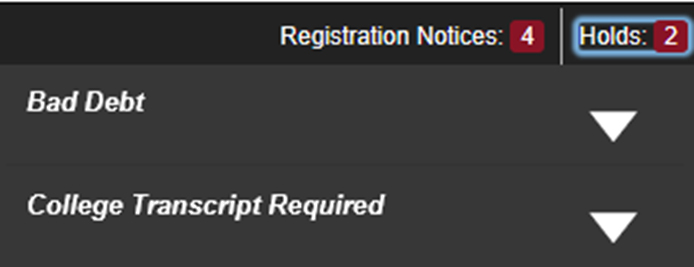
Click the arrow to the right of each hold to view the hold details:
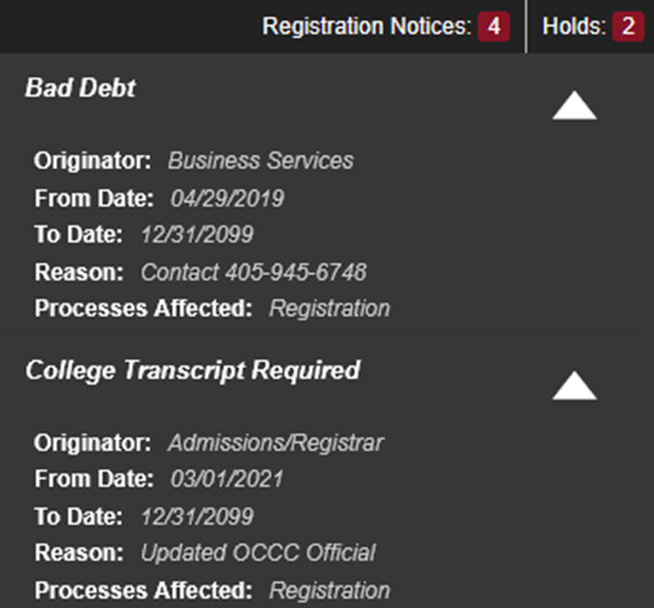
Below are descriptions of items displayed in the Hold details:
- Originator: The office that placed the hold, and the place you can contact for more information on what action you need to take to have the hold cleared.
- Reason: This column may indicate more details about why the hold was placed on your account.